Saturday, July 13, 2013

Download Droid VPN for Free

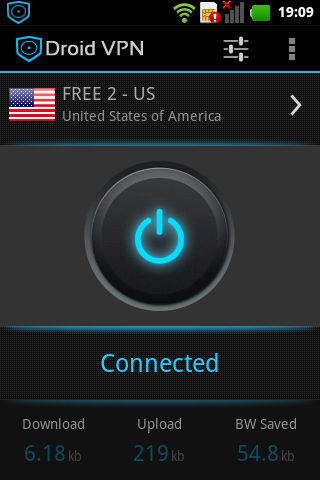
DroidVPN is an easy to use VPN software for android devices. It can help you to unblock regional internet restrictions, web filtering, bypass firewalls, and browse the web anonymously by tunneling all your internet traffic from your android device to our servers.
What separates DroidVPN from other VPN Applications is it can tunnel your traffic through ICMP(IP over ICMP). This means you can browse the internet even if you are only allowed to send ping requests and internet browsing is blocked on your firewall. Personal Android VPN app
Notes and Reminders

* FREE ACCOUNT is limited to 100MB/day and can only login to FREE SERVERS.
* Subscription is required if you want to use all the servers and remove the 100MB/day limit
* If you are using any Free RAM/Task manager application, then add DroidVPN to it's exclusion list to avoid DroidVPN from being unloaded in memory.
* PLEASE DO NOT REPORT customer support issues in REVIEWS! We will not be able to help you troubleshoot or report back to you any fix. Please send an email describing your problem in detail to support@droidvpn.com.
* If your phone is rebooting please read: http://droidvpn.com/page/phone-reboots-when-connecting-droidvpn-7/

FEATURES
- 1 Tap connect through widget
- Gives you unrestricted Speed
- Encrypts your internet traffic
- Unblocks web sites
- Tunnel IP traffic through ICMP or UDP (ICMP only works on rooted devices)
- Can sometimes connect to paid hotspots for free
- Save network traffic through data compression
- Block all annoying ads all over the web
LOCATION OF SERVERS
- Multiple Locations in US
- United Kingdom
- Netherlands
- Canada
- Italy
- Germany
View complete list here: http://droidvpn.com/servers.php
PREREQUISITES 
1. Android version below 4.0 requires root.
2. On android phones below 4.0 you need a working tun.ko for your phone. (Look for our "TUN.ko installer")
3. DroidVPN account. Signup for free here: http://droidvpn.com/signup.php
4. Working internet connection. DroidVPN is not a replacement for your ISP.
HOW TO USE
1. Enter the email that you registered and the password that is sent to you.
2. If you are using a free account make sure to change your server to "Free Server" by tapping the flag.
3. Press the large rounded connect button.
4. If the "DroidVPN is now connected" message appeared, press the home or back button
5. You can now start browsing and all your internet connection will pass through our VPN server.

Thursday, July 11, 2013

Download VLC for Android APK

Recent changes

  • This is the ninth beta of VLC for Android
  • The new beta is an important release after 0.0.8; it tests new audio and video output methods, and fixes many bugs
  • The audio now uses OpenSL ES, which should help improve audio/video sync. However, a preference setting allows you to use the former method, AudioTrack (Java)
  • For video, one can now select YV12 output: it should be faster, if it works :)
  • For older devices, 16-bit output should help display speed
  • But remember, this is still a beta ;)

Notes

Clicking the Download button will take you to a page on Google Play, from where you can purchase and install the app.

Tuesday, July 9, 2013

Best Cheap Android Handset


Magicon M3 Atom
Last but not the latest is the Magicon M3 Atom, which is cheapest phone in the category at Rs 3,250. The device sports a 3.5-inch display with a 2-megapixel rear camera and a VGA front camera for video calling and chatting.
Backed by a 1100mAh battery, the device is fueled by a Android 2.3 Gingerbread platform and 1GHz Qualcomm processor with similar storage, and connectivity options as the M2 Elegante.
This model like its sibling also has accelerometer, proximity sensor, light sensor, orientation sensor, Wi-Fi and Bluetooth connectivity. In addition it also supports popular apps like Skype, Facebook, Fruit Ninja, and Magicon Care.
Price: Rs 3,250

Wednesday, May 22, 2013

Fast and Furious 6 for Android Download


Quite often we have to notify our readers about great new applications that are becoming available to the mobile world, but have to bring the news that Android users are left waiting. This was certainly the case recently with the Fast & Furious 6 game but we now have the great news that it has been released for Android users via Google Play.

Only two days ago iOS users got access to the new game that comes along with the Fast & Furious 6 movie release, and the developers of the game didn’t leave millions of Android users waiting for too long as the free game is now available to download.

The game is based on the streets of London as players compete in a number of races purchasing new cars and tuning them up along the way. After only playing the game for a short time it was found to have some stunning graphics at least on par with CSR Racing.

While the game is a free download you are encouraged to progress at a quicker pace via in-app purchases, which won’t go down to well with some users that would prefer to pay upfront and just get on with the game.

The game sees you join a crew and you will need to earn their respect by showing off your driving skills that will see you drifting around corners. Early impressions show that the controls take a while to master as you have to change gear and perfect the art of drifting around corners at top speeds.

If you fancy having a race around the streets of London burning some rubber head over to Google Play.

Lego Star Wars: The Yoda Chronicles for Android Download

Download Diner Dash for Android


Few words sound less exciting next to each other than "time" and "management," but time management games have attracted legions of fans thanks to their accessibility and addictive gameplay. Diner Dash is the most popular franchise of the genre, and its debut title has now made its way into the Play Store with both free and paid versions available.
 
The game stars Flo, a former stockbroker who quits her job and starts her own restaurant. As Flo, players must seat and serve customers as quickly as possible. Flo will eventually upgrade her fledging restaurant and even open new ones. Part of Flo's appeal is how well she exemplifies the American Dream.

Flo has served quite a few households over the past decade. Diner Dash first appeared in 2003 for the PC and has since arrived on home consoles such as the Xbox 360, PS3, and Wii. Mobile versions have popped up on feature phones and iOS devices along with the PlayStation Portable and the Nintendo DS. Porting Diner Dash to Android removes the last excuse anyone who wants the game could make for not downloading it.

Exclusive restaurants can be purchased via in-app purchases, but gamers who spring for the Deluxe version will also get ten bonus levels for free. The latter version is temporarily available for just 99 cents below.

Download Diner Dash for Android

Top Free Apps on Android for Photo Editing


PhotoShake! Pro lets you create photo collages. Select the photos you want to use and randomly switch between different arrangements by shaking your phone or tablet. Choose from dozens of papers as background and move photos around within mini-frames. After editing, you can share photos to the most popular networking sites for everyone to see. There’s also the option to add stickers and speech balloons much like PicSay Pro.


With PhotoShake, you can easily combine one or more photos to make exciting and fun new images. PhotoShake is a photo editing program that you can use to share photos with family and friends on social networking sites.
You can easily create a collage photo as follow;
1. Select a theme.
2. Import photos for your collage and select paper type.
3. Simply shake your phone to get random collage images. (click "Edit" for manual select)
4. Also editing tool is available to create special effects on the final collage.

KEY FEATURES:
★ 6 photo theme support (MultiPhoto, SinglePhoto, InstantPhoto, GridPhoto, WidePhoto, SquareMania)
★ Easy photo creation by shake action.
★ High quality frame pinking
★ Various frame patterns
★ Place photo using translation, rotation, and scaling
★ Image filter for photos
★ Storytelling with various balloon item.
★ Funny sticker support.
★ Social media support (Twitter, Facebook, Flicker, Picasa, Blogger, Tumblr)
★ Save & Export.
★ Wallpaper support

PhotoShake allows user to create images from various occasions like everyday life, memorable moments, social gatherings, photo that has a story.
Make a precious memory with family, friends, or others.
Share your beautiful memories and fun episodes with your friends.
Joy and happiness start from your touch.
Top Free app on Android for photo editing

Saturday, May 18, 2013

Download ooVoo Video Call for Android


No one is better at video calls than ooVoo — it’s why more than 75 million people use us. 
ooVoo video chat gives you two things no one else can: Free multi-stream video calls with up to 12 people at a time along with unsurpassed stability and quality.
If you hate dropped calls, try ooVoo. Our unique technology means stunning video and crystal-clear audio. Here’s how we do it: Other video chat apps depend on the processing power of your device; our robust cloud servers give you rock-solid calling no matter where you are. And ooVoo adjusts your video call to match your connection speed so you can keep talking without interruption even when your network speed is low.
ooVoo with your crew and never miss a thing. Watch TV together, gossip, do homework, or go shopping — taking your friends along with you is easier with ooVoo on your Android smartphone or tablet. ooVoo video calls and text instant messaging (IMs) connect to other ooVoo users on any Android device, iPhone, iPad, iPod Touch or desktop and laptop PCs and Mac computers letting you make free video calls, voice calls, and send free instant messages from anywhere, at anytime.
ooVoo is free! It’s easy to sign up, quick to download, and a snap to use Facebook and Twitter to find and to invite your friends. Just say “ooVoo me!”
ooVoo is packed with features:
•Unlimited video calling, voice calling, unlimited instant text messaging. (Why? Because we love you.)
•12-way multi-stream group video calls with 4-way display. (It’s the only time you’ll be happy to be put in a box.)
•Send instant messages even while you’re on a video call. (It’s 2013—everything and everyone should multitask.)
•Search your address book, Facebook and Twitter for friends already on ooVoo. (Because “poking” and “following” are creepy.)
•With push notifications for incoming video calls and text chat messages, you’ll never miss an ooVoo call. (But you’ll have to come up with a different excuse for ignoring your ex.)